🌀 React Lifecycle — Explained Simply
Hello there! You know React, you’ve probably built several apps using it. But sometimes, when someone asks “What is the React Lifecycle?”, it’s hard to explain it in simple terms. So let’s break it down together and understand how to explain it in a way that even a beginner can follow.
What is Lifecycle in React?
Let’s say you have components — X, Y, and Z. React takes these components and turns them into JSX. These JSX expressions ultimately produce what the user sees in the browser.
But what happens between writing JSX and seeing output on the screen?
That’s what we call the React Lifecycle — the journey a component goes through from start to end.
1. Mount Phase (Initial Render)
This is when a component first appears on the screen.
🔹 What Happens:
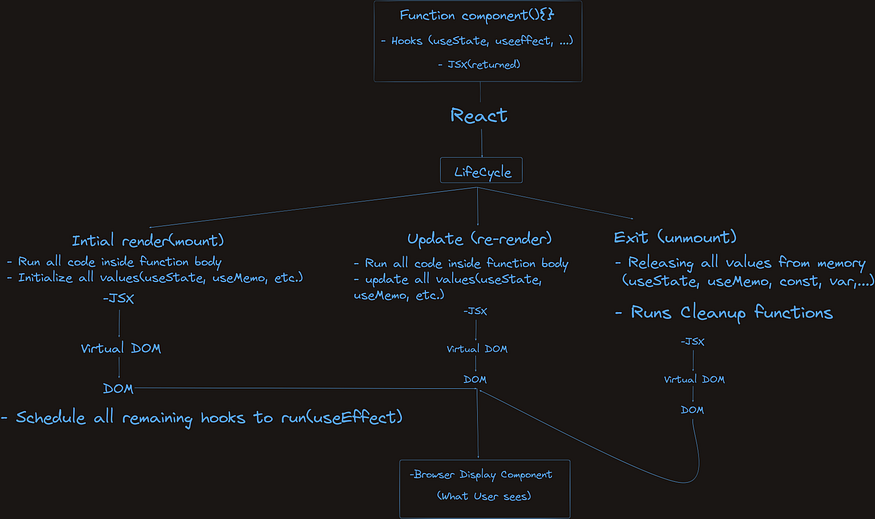
- React mounts the component — meaning it runs the entire function body of the component.
- It initializes all variables and hooks(
useState, useMemo,Constants (const,let,var) - JSX is returned.
- React passes this JSX to the Virtual DOM — a copy of the actual DOM that exists in memory.
- The Virtual DOM acts like a middleware — it checks for differences (diffing) between itself and the actual DOM.
- Once differences are found, it updates the Real DOM (what the user sees in the browser).
- The user finally sees the output on the screen.
🔸 After that:
- If there’s asynchronous code (like inside
useEffect), React schedules it to run after the component has been rendered in the browser. - So effects like data fetching or event listeners happen after the browser shows the component.
✅
useEffect(() => { ... }, [])runs after the component is mounted.
# Between Two Renders
Very Important:
Before running the next render, React will check if you have auseEffectwith a cleanup function, and it will run that cleanup first.
2. Update Phase (Re-render)
Once the component is on the screen, it may need to update
🔹 What Triggers an Update:
- A user interaction
- A change in
props - A change in
state - Timers, API calls, etc.
🔹 What Happens:
- React re-runs the component function — same as in the mount phase.
- It recomputes values, updates state, and checks if any state or props changed.
- JSX is returned again.
- Virtual DOM compares the new JSX with the previous version and figures out what changed.
- React updates only the changed parts in the Real DOM (efficient rendering).
- Browser reflects the updated UI.
🔸 In between renders:
- Cleanup functions (from
useEffectif you have define clean up function) are run before the next render. - After the update, any scheduled hooks or async code run again.
✅ Think of update phase as: Re-run → Diff → Update DOM → Re-run
useEffect→ Cleanup if needed
3. Unmount Phase (Exit)
This phase occurs when a component is removed from the screen — for example, when a user navigates away or the component is no longer needed.
🔹 What Happens:
- React releases all values from memory (
useState, useMemo,Variables likeconst,let, etc) - If you have a cleanup function in
useEffect, it runs now. - Virtual DOM prepares the change.
- React removes the component from the Real DOM.
- Browser no longer shows it.
✅
useEffect(() => { return () => { ... } }, [])handles cleanup on unmount.
🌐 Server-Side Lifecycle (SSR in React)
Until now, we talked about React on the client-side (i.e., the browser).
But there’s also server-side rendering (SSR), like in Next.js or custom setups.
🔹 What Happens on the Server:
- No hooks like
useEffectoruseStaterun on the server. - React just returns JSX, which is converted to HTML.
- This HTML is sent to the browser.
- Browser displays the content faster because it’s already rendered.
⚠️ There is no hooks like
useEffecton the server.
That’s why server-side components are faster, but you lose dynamic behavior during initial load.
🔸 Bonus Details:
- Server components can be async.
- You can perform tasks like:
- Fetching data from a database
- Calling APIs
- Running server-side logic
🔁 What if data changes on the server?
If data changes on the server, a server-side function will be triggered again. That function will:
- Fetch or reprocess the updated data
- Generate new JSX with the updated data
- JSX is then converted to HTML again
- The new HTML is sent to the client/browser
✅ This is like “re-rendering” on the server, but not the same as client-side re-renders — it’s regenerating the page HTML based on fresh data.
⚠️ Reminder:
- On the server, there is no lifecycle like
useEffect. - But we can respond to data changes by re-running the server function, which returns fresh JSX → HTML.